


Pawfex AI-AI Video Generation
4.6207.00 Reviews
App Specs
- Version
- 1.6.6
- Updated On
- License
- Free
- Downloads
- 50,000+
- Developer
- SINGAPORE BAOLU TECHNOLOGY PTE. LTD
- Categories
- Tools
- Platform
- Android
Screenshots
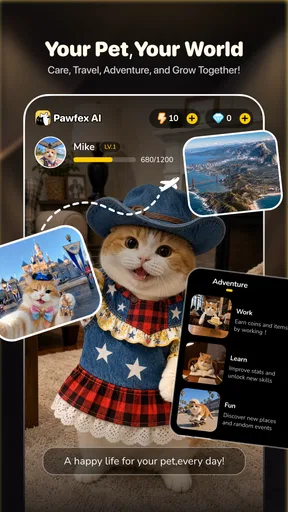
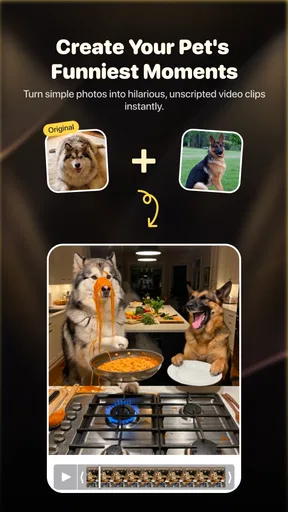
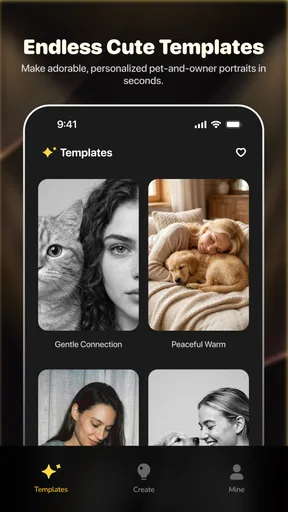
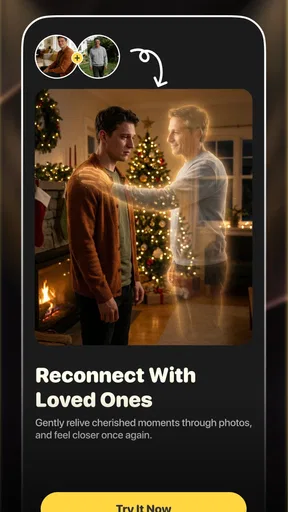
 Analysis by AppCompare
I spent time with Pawfex AI as an everyday creative tool for turning pet photos and video ideas into AI-generated content. Its appeal is easy to understand: instead of opening a full video editor, choosing effects, trimming clips, and trying to make a still image feel lively, I can begin with my pet and let the app handle much of the visual transformation. That makes it especially interesting for people who want something playful and shareable without learning a complicated editing workflow.
The app is listed as a free tool, with optional in-app purchases ranging from under a dollar to around forty dollars per item. It is rated for Everyone, so the basic concept is approachable for families and casual users. The developer is SINGAPORE BAOLU TECHNOLOGY PTE. LTD, and the app has reached a little over fifty thousand installs with a 4.6 average from roughly two thousand ratings. Those figures suggest a modest but active audience rather than a long-established mainstream editor.
Why the pet-to-video idea matters
The central capability is not simply adding a filter to a picture. The interesting part is using AI to reinterpret a pet image or video as a short visual scene. In practice, that changes the question from “How do I edit this clip?” to “What could this photo become?” That difference is important. Traditional mobile editors are strongest when I already know what I want: a cut here, music there, a caption over the top. An AI pet generator is more useful when I have a funny idea but not the editing skill or patience to build it manually.
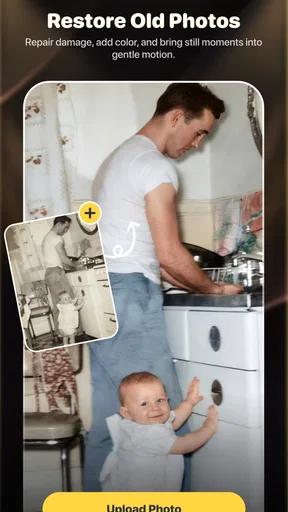
I found this approach most appealing for small moments that normally disappear into my camera roll. A dog making an unusual expression, a cat sitting in an oddly dramatic pose, or an old photo from a family album can become a more deliberate piece of content. The result is not necessarily a polished production, and I would not treat every generated clip as predictable. The value is in quickly exploring a visual idea and seeing whether the app can turn it into something entertaining.
That makes the experience different from ordinary photo editors, sticker apps, and conventional video makers. Those tools give me direct control. Pawfex AI is more about creative interpretation than precise editing. I give it source material and a direction, then judge the result. If I want exact timing, carefully aligned captions, or frame-by-frame control, a normal editor remains the better choice. If I want a pet photo to feel like the starting point for a playful experiment, this app has a clearer advantage.
What the capability changes for casual creators
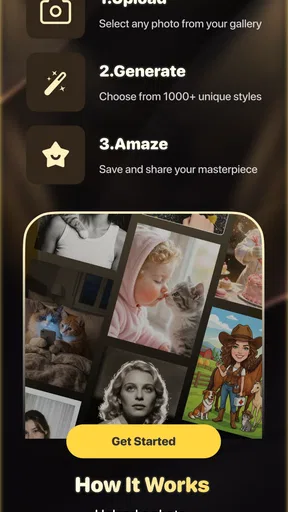
The biggest practical benefit is lowering the effort needed to make something worth sharing. A person who has never used a timeline editor can still approach an AI-based workflow naturally: choose a suitable pet image, try a concept, review the output, and decide whether it deserves another attempt. That is less intimidating than learning layers, transitions, keyframes, audio levels, and export settings before making anything at all.
There is also a useful emotional side to the format. Pet content works because the subject already has personality. The app does not need to invent a character from nothing; it starts with an animal that the viewer recognizes. When the source image has a clear expression or pose, the generated result can feel more personal than a generic animated template. I would use it for a birthday greeting, a private family joke, or a short social post where the pet is the main character.
Worth Reading Before You Choose

EA SPORTS FC Mobile 26 Is a Bigger Football Game, but It Takes Time

Flipboard Shows What News Apps Must Do Beyond the Feed

Switching to Android Auto Means Rethinking Your Driving Routine

Google Calendar Makes a Crowded Week Easier to Manage

Ludo King Makes the Most of the Minutes Between Plans

Baby Panda World Brings Quick Play to Modern Phones, but Its Game Library Feels Busy
At the same time, I would keep expectations realistic. AI generation is interpretive, so the output may not preserve every small detail of the original animal in the way a conventional slideshow would. If the exact markings, face, or body position matter, I would keep the original photo and treat the generated version as a creative extra rather than a replacement. This is one of the most important trade-offs: the more imaginative the transformation, the less control I have over faithful reproduction.
Using it in practice without wasting attempts
The quality of the starting material matters more than I expected. I get a better basis from a clear image where the pet is visible, reasonably well lit, and not hidden behind furniture or another animal. A crowded background can distract from the subject, while a blurry face gives the generator less useful visual information. Before creating anything, I would choose the strongest image rather than automatically selecting the newest one.
A helpful workflow is to begin with a simple idea. Instead of asking for an elaborate scene immediately, I would first test a straightforward transformation that keeps the pet recognizable. This gives me a reference for how the app handles that particular image. Once I know whether the face, fur pattern, and body shape survive the process well, I can try a more ambitious concept. This staged approach is more efficient than repeatedly submitting complicated ideas with a weak source photo.
I also recommend keeping a small set of source images ready. One front-facing portrait may work well for a character-style result, while a full-body image may be better for movement or a scene built around posture. A close-up is useful when the expression is the joke; a wider shot is more useful when the surroundings are part of the story. This is a non-obvious advantage of treating the app like a creative tool rather than a one-tap novelty: image selection becomes part of the creative decision.
Another practical tip is to compare the generated clip with the original before sharing it. AI effects can make a moment more dramatic, but they can also soften the details that made the original funny. I would save the unedited image separately and use the generated version only when it adds something clear. That habit prevents the app from becoming a replacement for the memories it is meant to enhance.
A realistic everyday example
Imagine taking a quick photo of a cat sitting beside a window while you are having coffee. With a normal editor, I might crop it, add text, and choose a soundtrack. With this app, I would use the photo as a starting point for a short AI-generated scene. If the result gives the cat a playful visual role while keeping enough of its recognizable appearance, I have a more memorable message to send to a friend than I would get from a standard filter.
The same workflow could suit a family group chat. A child’s favorite pet might appear in a lighthearted greeting, or an old dog photo could become a small tribute for someone who remembers it. In these cases, the point is not professional production quality. The point is speed, surprise, and a personal subject. I would still review the result before sending it, especially when the source image has sentimental value.
For social media, I would be more selective. A generated clip needs a clear idea in the first few seconds, because viewers are unlikely to wait for a confusing transformation to become interesting. I would choose a simple premise, avoid overloading the image with unrelated details, and use the shortest version that communicates the joke. The app can help create the visual hook, but it cannot decide whether the idea is actually funny or emotionally appropriate.
Where the experience becomes less convenient
The main limitation is the loss of direct control. In a traditional editor, I can correct a mistake by moving a clip, changing a crop, or removing one effect. With AI generation, the result depends more heavily on the source and the interpretation. If the pet’s appearance changes in an awkward way, I may need to try a different image or concept rather than fix one small section manually.
That uncertainty can also make the process feel less efficient when I am looking for a specific result. A person who wants a reliable slideshow with a pet’s original appearance throughout would likely be happier with a standard video editor. The usual alternative is less exciting, but it is predictable. I can place photos in order, control the duration, add a caption, and know what the final clip will look like. Pawfex AI is better when experimentation is acceptable.
Cost is another point to consider. The app can be installed and used as a free tool, but optional purchases are part of the experience. Because AI creation can encourage repeated experimentation, I would pay attention before confirming any purchase and decide whether the result is worth continuing with. Someone who only wants occasional playful content may find the free access sufficient, while a frequent creator should think carefully about how quickly optional spending could become part of the workflow.
Device compatibility is relatively broad for an Android utility, with support beginning at Android 7.0. That helps people using older phones, although AI processing can still feel more demanding than opening a basic gallery editor. I would expect the phone’s general performance and connection quality to affect how comfortable the process feels, even though the app’s minimum operating-system requirement is not especially demanding.
The current version is 1.6.6, which gives users a clear version reference when checking whether their installation is current. I would still keep the app updated through the relevant store, especially for a tool whose behavior can depend on generation services and changing creative functions. Updating is not a guarantee of a particular result, but it is sensible when an app’s main value comes from an evolving AI workflow.
Privacy and sharing judgment
Because the app works with personal pet photos and videos, I would be thoughtful about what I upload. A harmless picture of a dog in the garden is a different choice from a family photo containing children, a visible home address, or private surroundings. I would crop out unnecessary background details and avoid using images that reveal more than the creative idea requires.
I would also distinguish between making a clip and publishing it. A generated video may be amusing inside a private chat but feel strange when posted publicly. Before sharing, I would check whether the transformation still represents the pet in a way I am comfortable showing. This is particularly important for sentimental images: creative alteration can be fun, but it can also change the tone of a memory more than expected.
Who will get the most from it
The best audience is people who already enjoy pet content and want a low-effort way to make it more imaginative. It suits casual creators, families, and users who find conventional editing software too technical. It is also useful for someone who wants to test several creative directions quickly instead of spending an evening building one carefully controlled video.
I think it is especially good for turning ordinary source material into conversation starters. A pet does not need to perform a trick or be filmed at the perfect moment. A recognizable face, pose, or expression can be enough to begin. That makes the app valuable for users whose camera rolls are full of everyday pet photos rather than professionally staged footage.
On the other hand, I would skip it if my priority were exact visual consistency, detailed manual editing, or dependable preservation of the original animal’s appearance. A conventional editor is a better fit for training videos, carefully timed announcements, polished family montages, or any project where I need to know exactly what appears in every moment. I would also avoid making it my only archive for important photos; generated content should sit alongside the originals.
The Everyone age rating makes the concept approachable, but younger users should still have an adult involved when images are uploaded or purchases are considered. The app’s playful subject matter does not remove the need for sensible supervision around personal photos and spending. For adults, the main decision is simpler: do I want control, or do I want surprise?
My recommendation after using the concept as intended
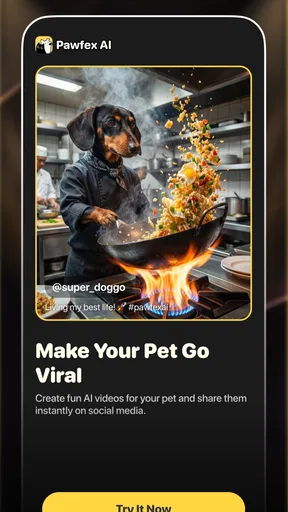
I see Pawfex AI as a focused creative companion rather than a complete replacement for mobile video editing. Its strongest verified purpose is generating AI pet videos and photos, and that focus is exactly why it can feel more inviting than a broad editor full of unrelated tools. It gives pet owners a quick route from a familiar image to an unusual visual idea.
The app is worth trying if I am happy to review results, choose source photos carefully, and accept that some attempts will be more successful than others. The smartest way to use it is to preserve the original, start with a clear concept, and treat each generation as an interpretation rather than a guaranteed copy. That mindset makes the creative uncertainty feel like part of the fun instead of a technical failure.
My final view is positive but specific: this is a good choice for playful pet-centered experiments, private jokes, greetings, and short social clips. It is not the right tool for precise editing or faithful archival videos. If I wanted one app to make my pet photos feel more alive without learning a full editing system, I would give it a try. If I needed predictable timing and complete control, I would reach for a traditional editor instead.
Pros
- Creates engaging pet videos from simple text prompts.
- AI effects can make ordinary pet photos feel more creative.
- Useful for social media posts
- stories
- and short-form content.
- A playful tool for experimenting with different visual styles.
- Saves time compared with editing pet videos manually.
Cons
- Results may not accurately preserve your pet’s appearance.
- Generated videos can include odd movements or visual glitches.
- Advanced creations may require credits or in-app purchases.
- Processing times can vary
- especially for complex prompts.
- Privacy policies should be checked before uploading personal pet photos.
FAQs for Pawfex AI-AI Video Generation
What is Pawfex AI-AI Video Generation, and what can I use it for?
Pawfex AI-AI Video Generation is an artificial intelligence tool designed to create videos from written prompts, images, or other user-provided ideas. It may be useful for producing short social media clips, creative concepts, animated scenes, promotional material, or experimental visual content. Before downloading, check the app’s current feature list because supported input types, video styles, export options, and generation limits can vary between versions and platforms.
Does Pawfex AI-AI Video Generation require a subscription or in-app purchases?
The app may offer a free way to test its video-generation features, but advanced tools, higher-quality exports, faster processing, additional credits, or watermark removal can require in-app purchases or a recurring subscription. Review the pricing page carefully before starting a trial, especially the renewal terms and cancellation procedure. Also check whether unused generation credits expire and whether refunds are handled through Google Play or the App Store.
Can Pawfex AI-AI Video Generation work offline?
AI video generation normally depends on remote servers because creating a video requires considerable processing power. For that reason, Pawfex AI-AI Video Generation is likely to need an active internet connection for submitting prompts, uploading images, processing requests, and downloading finished results. Mobile data usage may be significant when uploading source files or exporting videos, so a stable Wi-Fi connection is generally preferable for longer or higher-resolution generations.
Are videos created with Pawfex AI-AI Video Generation suitable for commercial use?
Commercial usage depends on Pawfex’s current terms of service, the subscription level you choose, and the material used to create each video. AI-generated content may still involve copyright, trademark, privacy, or publicity-right concerns, particularly when prompts include recognizable people, protected characters, music, logos, or third-party images. Read the licensing conditions before using outputs in advertising, client projects, monetized channels, or other professional work.
What privacy and safety issues should I consider before using Pawfex AI-AI Video Generation?
Before uploading photographs, personal videos, faces, documents, or confidential ideas, review Pawfex’s privacy policy and permissions. Find out how uploaded files and prompts are stored, whether they are used to improve AI models, how long they remain on company servers, and whether deletion is available. Avoid submitting sensitive information, and remember that generated videos can unintentionally reproduce stereotypes, misleading imagery, or inappropriate content depending on the prompt.


